> ## Documentation Index
> Fetch the complete documentation index at: https://docs.techfootintl.com/llms.txt
> Use this file to discover all available pages before exploring further.
# Aged Receivables
> Outstanding customer balances broken down by how long they've been unpaid.
Outstanding customer balances broken down by how long they've been unpaid, per customer.
Select **AR Aging Report** from the **Report Type** dropdown, set a date range, and click **Fetch Report**. The **Invoices** and **Search** filters narrow the result set further.
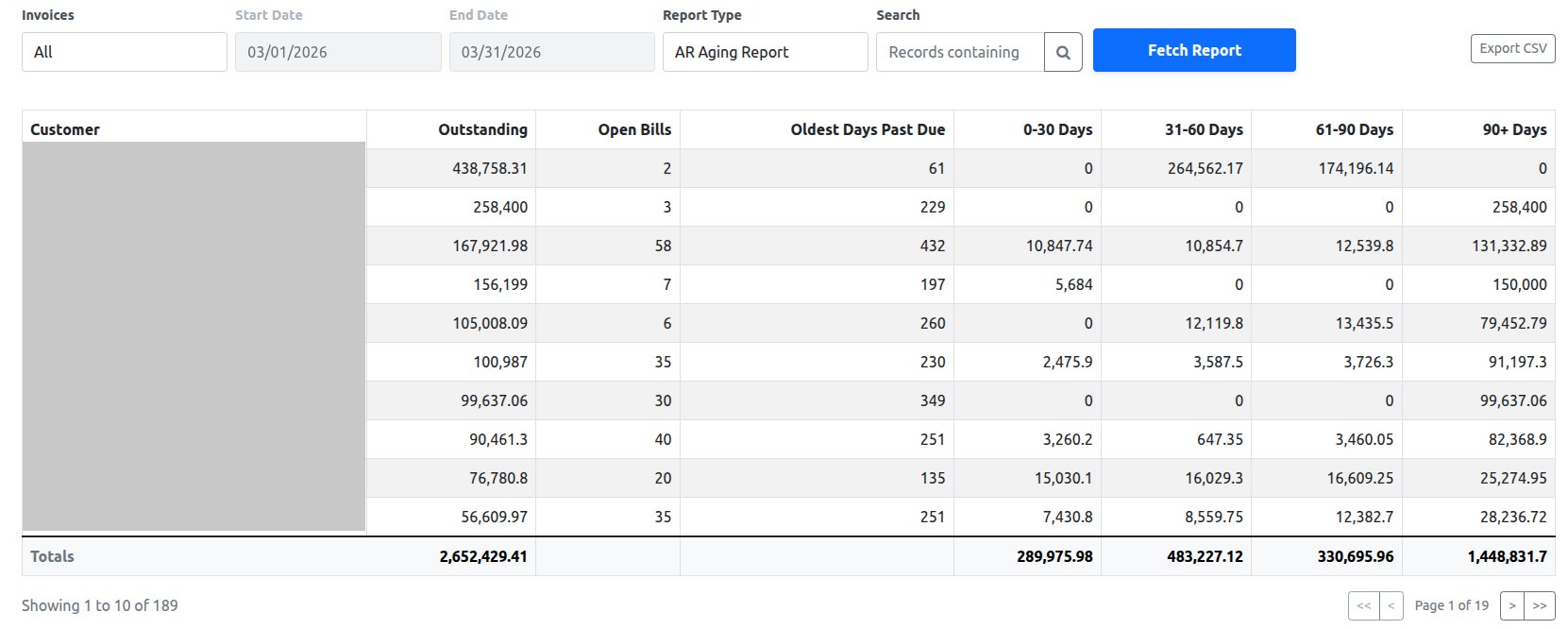 | Column | Description |
| :------------------- | :----------------------------------------------------------- |
| Customer | Customer the outstanding balance belongs to |
| Outstanding | Total unpaid balance across all of the customer's open bills |
| Open Bills | Count of unpaid bills contributing to the Outstanding total |
| Oldest Days Past Due | Age, in days, of the customer's oldest unpaid bill |
| 0-30 Days | Outstanding amount aged 0–30 days |
| 31-60 Days | Outstanding amount aged 31–60 days |
| 61-90 Days | Outstanding amount aged 61–90 days |
| 90+ Days | Outstanding amount aged more than 90 days |
A **Totals** row sums Outstanding and each aging bucket across every customer matching the current filters — not just the 10 shown on the current page.
**Export CSV** downloads the full filtered result set (all pages) with the same columns as the table.
| Column | Description |
| :------------------- | :----------------------------------------------------------- |
| Customer | Customer the outstanding balance belongs to |
| Outstanding | Total unpaid balance across all of the customer's open bills |
| Open Bills | Count of unpaid bills contributing to the Outstanding total |
| Oldest Days Past Due | Age, in days, of the customer's oldest unpaid bill |
| 0-30 Days | Outstanding amount aged 0–30 days |
| 31-60 Days | Outstanding amount aged 31–60 days |
| 61-90 Days | Outstanding amount aged 61–90 days |
| 90+ Days | Outstanding amount aged more than 90 days |
A **Totals** row sums Outstanding and each aging bucket across every customer matching the current filters — not just the 10 shown on the current page.
**Export CSV** downloads the full filtered result set (all pages) with the same columns as the table.