> ## Documentation Index
> Fetch the complete documentation index at: https://docs.techfootintl.com/llms.txt
> Use this file to discover all available pages before exploring further.
# Post Readings
After all usage for the billing term has been captured, the next step in the billing lifecycle is **Post Readings**.
The purpose of this process is to consolidate and finalize all usage information collected during the term so it can be used during bill calculation.
Depending on the service configuration, the system processes usage differently for metered and unmetered services.
* For **Metered Services**, the system selects the latest valid meter reading recorded during the billing period.
* For **Unmetered Services**, the system calculates the total usage by summing all recorded usage transactions for the billing period.
Once posting is completed, the finalized usage values become available for bill processing.
## Position in the Billing Lifecycle
The Post Readings process occurs after all usage has been collected and validated.
```mermaid theme={null}
graph TD
%% Define Nodes
A["Create Term"]
B["Capture Metered Usage"]
C["Capture Unmetered Usage"]
D["Validate Usage"]
E["Post Readings"]
F["Process Bills"]
G["Post Bills"]
%% Define Connections
A --> B
A --> C
B --> D
C --> D
D --> E
E --> F
F --> G
%% Styling for a clean, professional look
style A fill:#fff,stroke:#333,stroke-width:1px
style B fill:#fff,stroke:#333,stroke-width:1px
style C fill:#fff,stroke:#333,stroke-width:1px
style D fill:#fff,stroke:#333,stroke-width:1px
style E fill:#fff,stroke:#333,stroke-width:1px
style F fill:#fff,stroke:#333,stroke-width:1px
style G fill:#fff,stroke:#333,stroke-width:1px
```
# Purpose of Post Readings
During a billing period, multiple usage records may be received from various sources.
Examples include:
* Multiple meter readings
* Daily usage transactions
* Imported consumption records
* Service activity records
* System-generated usage values
The Post Readings process converts these raw records into a single billable usage value for each service.
# Metered Services
## How Metered Posting Works
For metered services, the system identifies the most recent valid meter reading captured during the billing term.
The latest reading becomes the **Current Reading** for billing purposes.
The previous posted reading becomes the **Previous Reading**.
Consumption is calculated as:
```text theme={null}
Consumption = Current Reading - Previous Reading
```
## Example
### Meter Readings Captured During the Term
| Reading Date | Reading Value |
| :----------- | :------------ |
| 05-Jan-2025 | 12,500 |
| 12-Jan-2025 | 12,850 |
| 20-Jan-2025 | 13,050 |
| 31-Jan-2025 | 13,250 |
During Post Readings:
* Previous Posted Reading = 12,000
* Latest Reading Found = 13,250
### Result
| Field | Value |
| :--------------- | :---------- |
| Previous Reading | 12,000 |
| Current Reading | 13,250 |
| Consumption | 1,250 Units |
The latest reading is selected regardless of how many intermediate readings exist.
## Why Use the Latest Reading?
Selecting the latest reading ensures:
* Accurate end-of-period consumption
* Consistent billing calculations
* Support for multiple reading submissions
* Simplified auditing and reporting
## Post Current Reading:
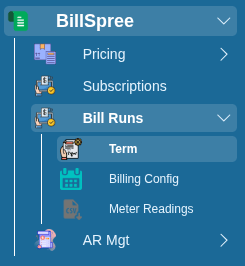
1-Go to **BillSpree** **→Bill Runs →Term**
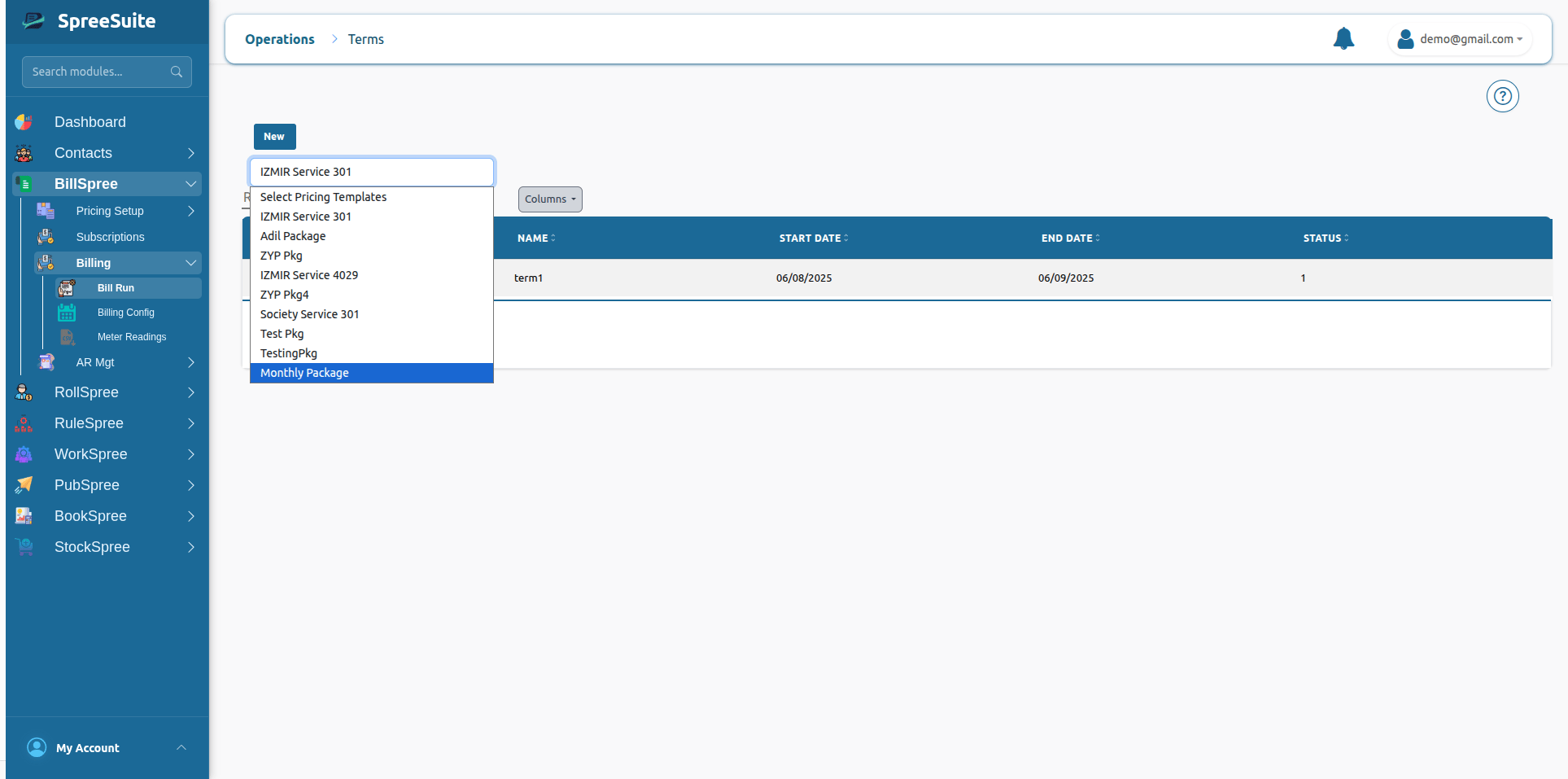
 2-Select **Pricing template** of Term:\\
 # Unmetered Services
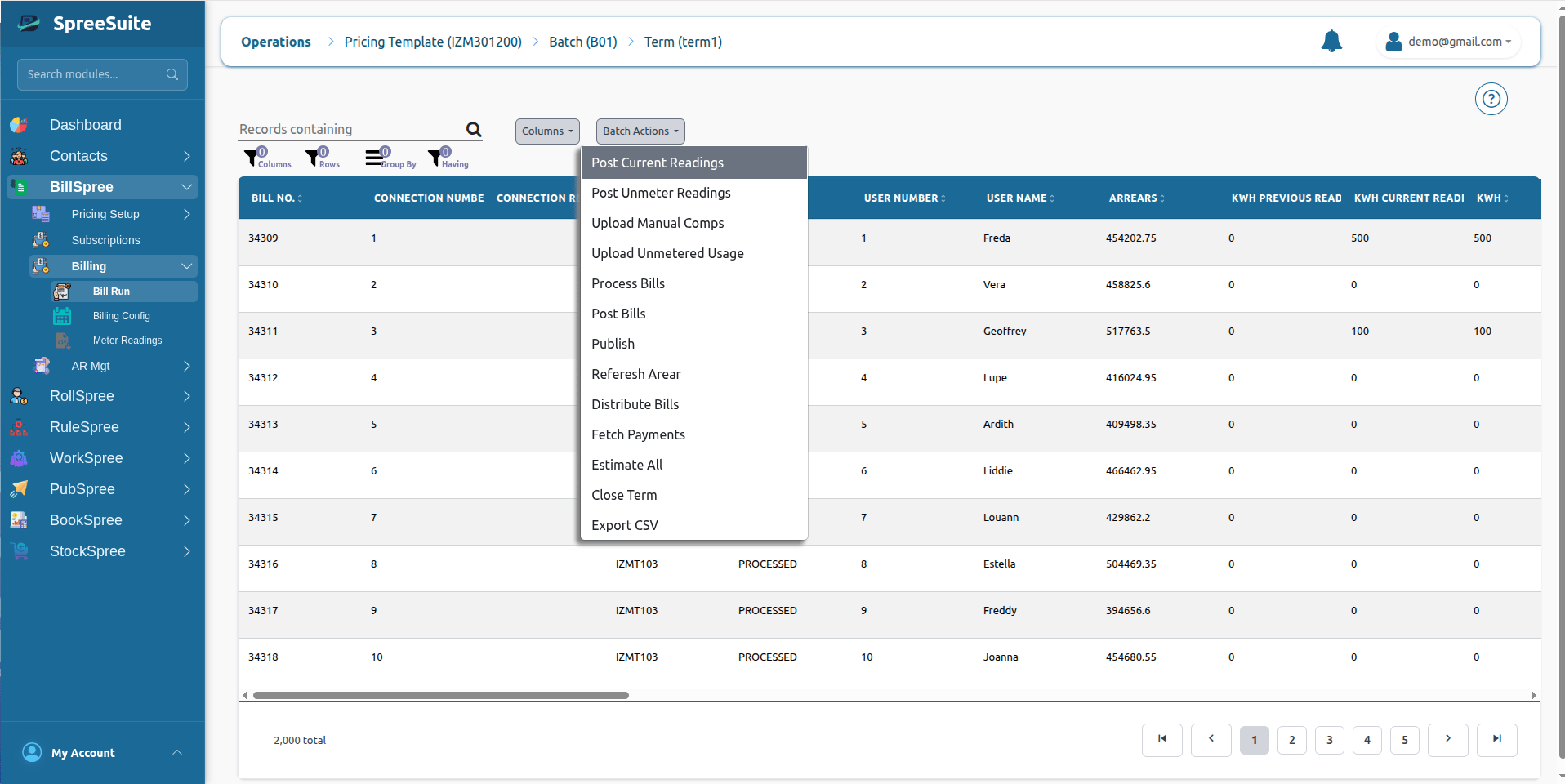
3-Click on **Batch Action** and Select **Post Current Reading**.
# Unmetered Services
3-Click on **Batch Action** and Select **Post Current Reading**.
 ## How Unmetered Posting Works
Unmetered services do not use physical meters.
Instead, usage is recorded through service activities, operational transactions, imports, or manually entered quantities.
During Post Readings, the system aggregates all usage records belonging to the billing term.
The total becomes the billable usage quantity.
## Example
### Usage Records Captured During the Term
| Date | Usage Quantity |
| :---------- | :------------- |
| 03-Jan-2025 | 10 |
| 08-Jan-2025 | 15 |
| 15-Jan-2025 | 20 |
| 28-Jan-2025 | 5 |
### Calculation
```text theme={null}
Total Usage = 10 + 15 + 20 + 5
Total Usage = 50
```
### Result
| Field | Value |
| :----------------- | :------- |
| Total Transactions | 4 |
| Posted Usage | 50 Units |
## Post Unmetered Reading:
1-Go to **BillSpree** **→Bill Runs →Term**
2-Select **Pricing template** of Term:
# Unmetered Services
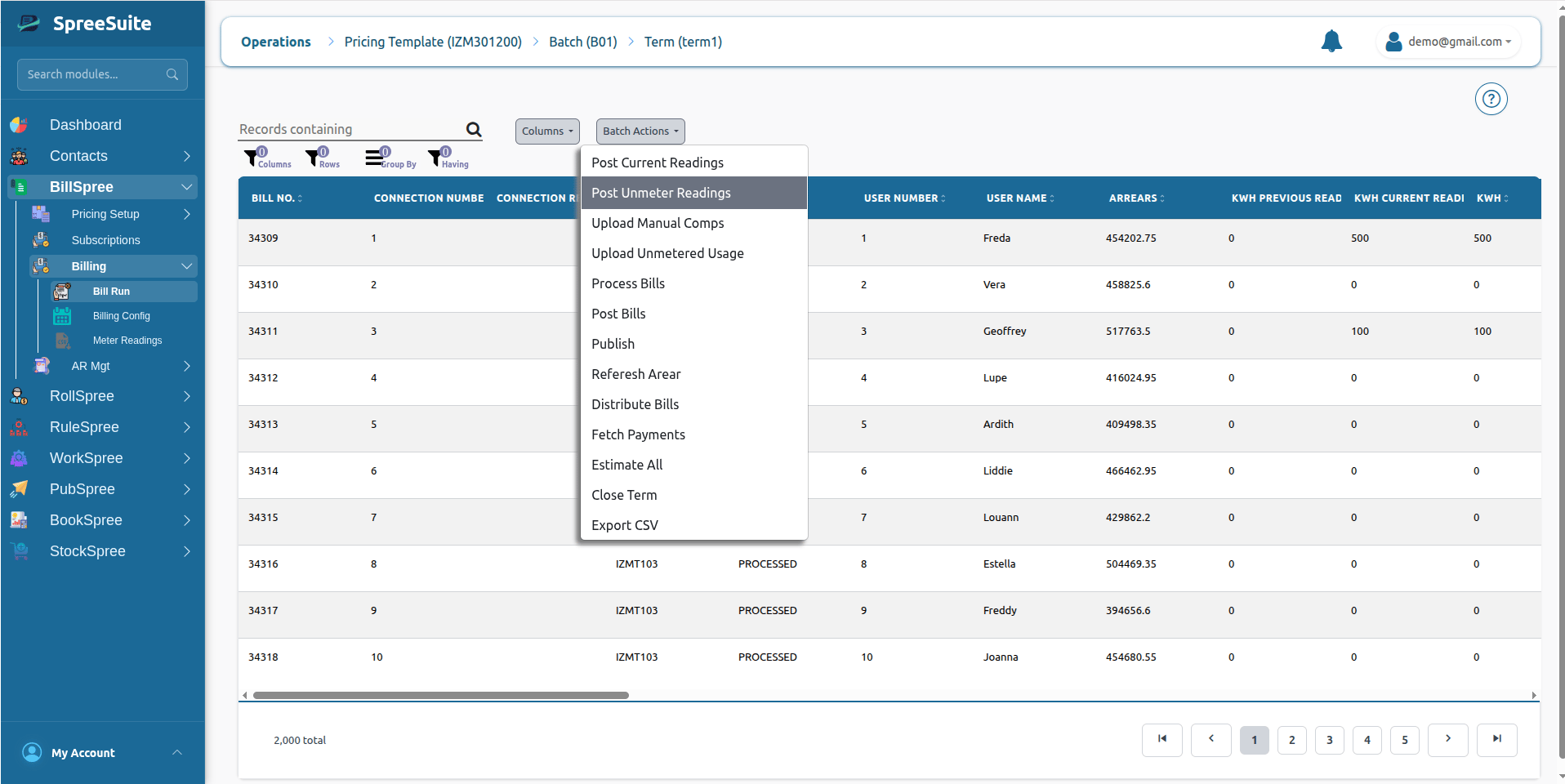
3-Click on **Batch Action** and Select **Post Unmetered Reading**.
## How Unmetered Posting Works
Unmetered services do not use physical meters.
Instead, usage is recorded through service activities, operational transactions, imports, or manually entered quantities.
During Post Readings, the system aggregates all usage records belonging to the billing term.
The total becomes the billable usage quantity.
## Example
### Usage Records Captured During the Term
| Date | Usage Quantity |
| :---------- | :------------- |
| 03-Jan-2025 | 10 |
| 08-Jan-2025 | 15 |
| 15-Jan-2025 | 20 |
| 28-Jan-2025 | 5 |
### Calculation
```text theme={null}
Total Usage = 10 + 15 + 20 + 5
Total Usage = 50
```
### Result
| Field | Value |
| :----------------- | :------- |
| Total Transactions | 4 |
| Posted Usage | 50 Units |
## Post Unmetered Reading:
1-Go to **BillSpree** **→Bill Runs →Term**
2-Select **Pricing template** of Term:
# Unmetered Services
3-Click on **Batch Action** and Select **Post Unmetered Reading**.
 The summed value becomes the usage quantity used during bill calculation.
# Example Billing Scenario
## Metered Service
### Electricity Account
| Item | Value |
| :--------------- | :-------- |
| Previous Reading | 5,450 |
| Latest Reading | 5,720 |
| Consumption | 270 Units |
Bill calculations use 270 units.
## Unmetered Service
### Waste Collection Service
| Item | Value |
| :----------- | :---- |
| Collection 1 | 1 |
| Collection 2 | 1 |
| Collection 3 | 1 |
| Total Usage | 3 |
Bill calculations use 3 service units.
# Summary
Post Readings finalizes usage for a billing term by selecting the latest meter reading for metered services and summing all usage transactions for unmetered services, creating the billable consumption values used during bill processing.
The summed value becomes the usage quantity used during bill calculation.
# Example Billing Scenario
## Metered Service
### Electricity Account
| Item | Value |
| :--------------- | :-------- |
| Previous Reading | 5,450 |
| Latest Reading | 5,720 |
| Consumption | 270 Units |
Bill calculations use 270 units.
## Unmetered Service
### Waste Collection Service
| Item | Value |
| :----------- | :---- |
| Collection 1 | 1 |
| Collection 2 | 1 |
| Collection 3 | 1 |
| Total Usage | 3 |
Bill calculations use 3 service units.
# Summary
Post Readings finalizes usage for a billing term by selecting the latest meter reading for metered services and summing all usage transactions for unmetered services, creating the billable consumption values used during bill processing.