> ## Documentation Index
> Fetch the complete documentation index at: https://docs.techfootintl.com/llms.txt
> Use this file to discover all available pages before exploring further.
# AR Aging Report
> Outstanding customer balances broken down by how long they have been unpaid.
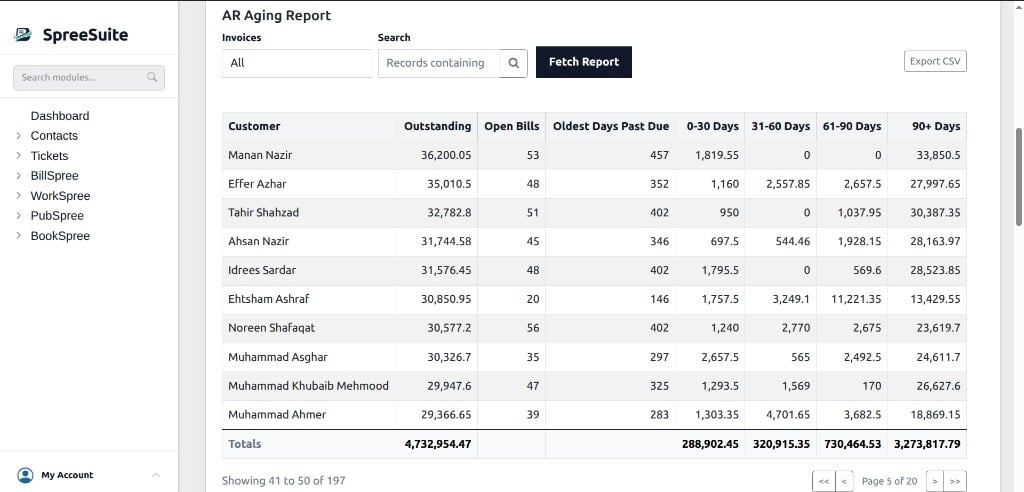
The **AR Aging Report** shows who owes you money and how long those balances have been outstanding. Amounts are grouped by customer and split into aging buckets so collections can focus on the oldest debt first.
Balances come from each bill’s remaining amount due. As payments, credit notes, and manual settlements are applied, outstanding amounts drop and customers leave the report when nothing remains due.
 ## Where to find it
1. In the left sidebar, open **Dashboard**.
2. Select the **Billing** tab.
3. Scroll below the Billing–Payment chart to the **AR Aging Report** section.
The table loads when you open the **Billing** tab. After you change filters, click **Fetch Report**. Use **Export CSV** to download the full result set.
The same **Billing** tab includes [Monthly Sales and Payments](/billing/reports/monthly-sales-and-payments). Click a Sales or Payment bar to open bill-level **Details** for that month; the AR Aging Report remains below the chart.
## Filters
| Control | What it does |
| :--------------- | :---------------------------------------------------------------------------- |
| **Invoices** | **All** (default), **Single Invoice** only, or a specific **Pricing Context** |
| **Search** | Narrows customers and records (placeholder: *Records containing*) |
| **Fetch Report** | Reloads the table with the current filters |
| **Export CSV** | Downloads all matching customers (every page), including a Totals row |
Aging is as of **today**, based on each bill’s due date.
## Columns
| Column | Description |
| :------------------- | :----------------------------------------------------------- |
| Customer | Customer the outstanding balance belongs to |
| Outstanding | Total unpaid balance across all of the customer’s open bills |
| Open Bills | Count of unpaid bills contributing to Outstanding |
| Oldest Days Past Due | Age, in days, of the customer’s oldest unpaid bill |
| 0-30 Days | Outstanding amount 0–30 days past due |
| 31-60 Days | Outstanding amount 31–60 days past due |
| 61-90 Days | Outstanding amount 61–90 days past due |
| 90+ Days | Outstanding amount more than 90 days past due |
Rows are ordered by highest outstanding balance first. Results are paginated by customer (for example 10 per page).
## What is included
The report includes open sale-side bills that still have a remaining balance due. It typically excludes:
* Purchase invoices
* Bills in **Failed**, **Draft**, or **INACTIVE** status
* Bills with no remaining outstanding balance
Bills that are not yet due can still appear in **Outstanding** and **Open Bills**. Their amounts move into the 0–30 … 90+ buckets once the due date has passed.
## How outstanding is calculated
Each open bill contributes its remaining balance due (updated when the bill is posted and when payments or credits are applied). Those bill-level amounts are summed per customer into Outstanding and into the matching aging bucket based on days past due.
Related actions that change what you see here:
* Applying a payment (allocated to open bills in due-date order)
* Posting a credit note against the customer’s balance
* [Settle Bill](/ar/settle-bill) to mark a specific invoice fully settled without recording a payment
## Related
* [Monthly Sales and Payments](/billing/reports/monthly-sales-and-payments)
* [AR Overview](/ar/overview)
* [Settle Bill](/ar/settle-bill)
## Where to find it
1. In the left sidebar, open **Dashboard**.
2. Select the **Billing** tab.
3. Scroll below the Billing–Payment chart to the **AR Aging Report** section.
The table loads when you open the **Billing** tab. After you change filters, click **Fetch Report**. Use **Export CSV** to download the full result set.
The same **Billing** tab includes [Monthly Sales and Payments](/billing/reports/monthly-sales-and-payments). Click a Sales or Payment bar to open bill-level **Details** for that month; the AR Aging Report remains below the chart.
## Filters
| Control | What it does |
| :--------------- | :---------------------------------------------------------------------------- |
| **Invoices** | **All** (default), **Single Invoice** only, or a specific **Pricing Context** |
| **Search** | Narrows customers and records (placeholder: *Records containing*) |
| **Fetch Report** | Reloads the table with the current filters |
| **Export CSV** | Downloads all matching customers (every page), including a Totals row |
Aging is as of **today**, based on each bill’s due date.
## Columns
| Column | Description |
| :------------------- | :----------------------------------------------------------- |
| Customer | Customer the outstanding balance belongs to |
| Outstanding | Total unpaid balance across all of the customer’s open bills |
| Open Bills | Count of unpaid bills contributing to Outstanding |
| Oldest Days Past Due | Age, in days, of the customer’s oldest unpaid bill |
| 0-30 Days | Outstanding amount 0–30 days past due |
| 31-60 Days | Outstanding amount 31–60 days past due |
| 61-90 Days | Outstanding amount 61–90 days past due |
| 90+ Days | Outstanding amount more than 90 days past due |
Rows are ordered by highest outstanding balance first. Results are paginated by customer (for example 10 per page).
## What is included
The report includes open sale-side bills that still have a remaining balance due. It typically excludes:
* Purchase invoices
* Bills in **Failed**, **Draft**, or **INACTIVE** status
* Bills with no remaining outstanding balance
Bills that are not yet due can still appear in **Outstanding** and **Open Bills**. Their amounts move into the 0–30 … 90+ buckets once the due date has passed.
## How outstanding is calculated
Each open bill contributes its remaining balance due (updated when the bill is posted and when payments or credits are applied). Those bill-level amounts are summed per customer into Outstanding and into the matching aging bucket based on days past due.
Related actions that change what you see here:
* Applying a payment (allocated to open bills in due-date order)
* Posting a credit note against the customer’s balance
* [Settle Bill](/ar/settle-bill) to mark a specific invoice fully settled without recording a payment
## Related
* [Monthly Sales and Payments](/billing/reports/monthly-sales-and-payments)
* [AR Overview](/ar/overview)
* [Settle Bill](/ar/settle-bill)